Spilled a drink on your MacBook: what to do right now
A coffee in a café, a beer at dinner, a coconut on the villa table. A spill does not kill a MacBook in the first second — what kills it is the next ten minutes and the week after.
The first two minutes
- Switch it off. Hold the power button until the screen goes dark. Do not save, do not close the apps — every second it stays on with liquid inside costs more than the unsaved file.
- Unplug the charger and everything else connected to it.
- Turn it over like a tent — opened, keyboard down, on a towel — so the liquid runs out the way it came in and not further onto the board.
- Leave it off. Recent MacBooks start up on their own when you open the lid or plug them in, so once it is off, keep it open and unplugged.
- Bring it in the same day, or the next morning if it happened at night.
Why coffee and beer are worse than water
Water dries. A sweet or sticky drink does not: it leaves a film on the board that conducts electricity, holds moisture and keeps eating the contacts for days. That is why a MacBook can work after a spill and die a week later.
There is a second reason not to wait. The battery in a MacBook stays connected to the board even when the laptop is off, so some of the board is always powered. Liquid on a powered board corrodes whether you are using the machine or not — the only way to stop it is to open the laptop and disconnect the battery.
What makes it worse
- Switching it on to see if it still works. If it does, you learn nothing. If the liquid is in the wrong place, that is the moment something burns.
- Plugging in the charger. More power on a wet board, nothing else.
- A hair dryer, the sun or a bag of rice. None of them reach the liquid under the board, and heat only dries the sugar into a crust.
- Carrying on because it seems fine. The keys that start sticking and the trackpad that stops clicking a week later are the same spill.
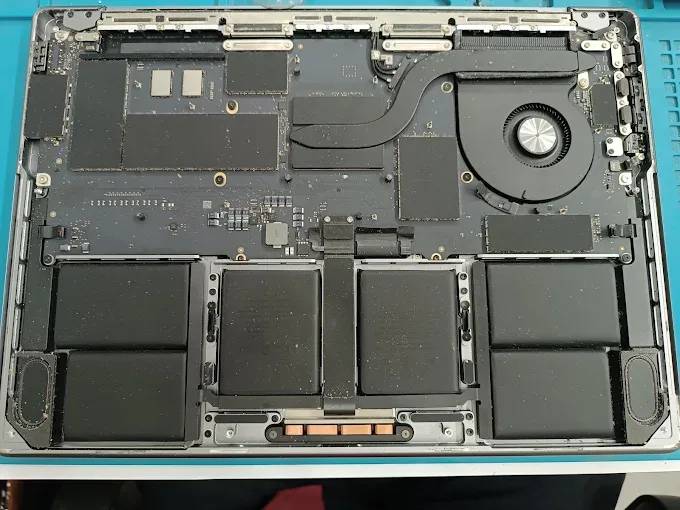
What we do with a liquid-damaged MacBook
We take the machine apart, disconnect the battery and find where the liquid went. The logic board is cleaned in an ultrasonic bath, which gets the residue out from under the chips where a brush cannot reach. Components the liquid has killed are replaced under a microscope.
You get a diagnosis within a day, and cleaning takes one to three days. Diagnostics are free and we agree the price with you before we start; the starting price for each model is on the prices page. The repair is covered by our one-month warranty on the parts we fitted and the work we did.
What about the files
On current MacBooks the storage is part of the logic board, so saving the files means getting that board to run again. If the memory survived, we get your data out even when the laptop itself is not worth repairing. We cannot promise it in advance — but ask before you give up on the machine.
Phone went into the water instead? See what to do with a wet iPhone.
Common questions
My MacBook works fine after the spill. Should I still have it checked?
Can I dry a MacBook with a hair dryer or in the sun?
How long does MacBook liquid damage repair take?
Can you save my files if the MacBook will not turn on?
Just spilled something?
Switch it off and message us the model and what went in. We have workshops in Canggu and Ubud, open Monday to Saturday.